H685t-W - Antenna Information and Installation
This article covers the antenna connectors on the H685t-W, the standard antennas supplied with the router, and guidance on antenna selection, installation, and cable length.
Antenna connectors
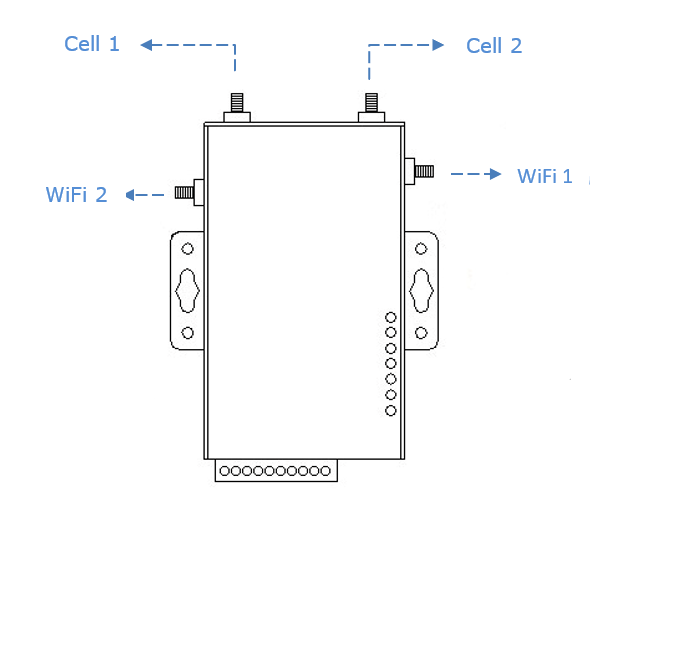
| Port label | Connector type | Purpose |
|---|---|---|
| CELL 1 | SMA female | Main cellular antenna |
| CELL 2 / CELL AUX | SMA female | Auxiliary cellular antenna (diversity) |
| WIFI 1 and WIFI 2 | SMA female | Wi-Fi antennas |
| GPS | SMA female | GPS antenna (non-standard, optional extra) |
All supplied antennas use SMA male connectors to mate with the router's SMA female ports.
Supplied antennas
The H685t-W ships with two antenna types — stick and mag-mount — for use in different installation environments.
Stick antennas
Stick antennas screw directly onto the router's SMA ports. They are suitable when the router is installed in a location with adequate signal — for example, mounted on a wall or DIN rail in a location with line-of-sight to the cellular network. The short distance between antenna and modem minimises cable signal loss.
Mag-mount antennas
Mag-mount antennas are connected to the router via a coaxial cable, with the antenna head positioned remotely on a metal surface. They are suitable when the router is installed inside a metal cabinet or enclosure where direct signal reception is poor.
Ground plane requirement: Mag-mount antennas require a flat metal surface of at least 30 cm × 30 cm as a ground plane (e.g., the top of a metal cabinet). The antenna must be placed on a horizontal metal surface — plastic, wood, and fibreglass surfaces will significantly reduce performance.
Installation
- Align the SMA male connector on the antenna with the SMA female port on the router
- Thread the connector by hand, then tighten by turning clockwise until snug — do not over-tighten
- To remove, turn anti-clockwise
Use both CELL 1 and CELL 2 for best performance. The 4G modem uses antenna diversity across both ports to maximise signal quality and data throughput. Connecting only one antenna will reduce performance. Most external antenna housings for 4G include two antenna elements with two cables for this reason.
External antennas and cable length
When an external antenna with a cable is used, signal is lost along the length of the coaxial cable. This loss is significant at 4G/LTE frequencies:
- For high-bandwidth applications, keep the coaxial cable to 5 m or less
- For lower-bandwidth applications where signal is strong, cables of 15–25 m may be acceptable
- Where possible, position the router close to the antenna and run a longer Ethernet cable to the rest of the network — this avoids signal loss in the RF path entirely